
Contents (16 sections)
In today's fast-paced world, trying to find suitable activities can feel overwhelming. Whether you're planning events or looking for ways to enjoy your free time, Activity Finder Pro is here to simplify the process. This tutorial will guide you through choosing the best activities using the app, ensuring you create memorable experiences.
1. Understand the Purpose of Activity Finder Pro
Activity Finder Pro is specifically designed to help users discover activities that align with their interests, availability, and location. By using this app, you can streamline the process of planning activities, whether for family outings, team-building exercises, or personal leisure time.
Why Use Activity Finder Pro?
Utilising this tool can significantly enhance your planning capabilities. According to a recent survey by UFC-Que Choisir, an increasing number of people rely on apps for leisure planning to ensure they utilise their time effectively and maximize enjoyment. The app provides tailored recommendations based on various criteria, thus helping you avoid the cumbersome task of sifting through endless options. Additionally, it aids in accessing real-time updates and feedback from other users, contributing to informed decision-making.
2. Step-by-Step Guide to Using the App
Step 1: Download and Set Up
To kick off your journey, download Activity Finder Pro from a trusted source. Once installed, create a profile to input your preferences, including interests, age groups, and activity types. This personalisation ensures the app curates suggestions that match your needs seamlessly.
Step 2: Explore Categories
Navigate through various categories available in the app. From outdoor adventures to cultural events, the categorised approach helps streamline your search. Take note of seasonal activities or trending popular options that appear in the app based on user feedback. Another tip is to frequently check for local events that may not be listed publicly to find hidden gems that could enhance your experience.
Step 3: Use Filters Wisely
Employ the filtering capabilities to hone in on activities that fit your specified criteria. For example, if you’re looking for an activity suitable for young children, use filters for ageappropriateness, duration, and location. This is particularly helpful during peak times, like school holidays or weekends, ensuring you can manage your schedule more efficiently.
Step 4: Check Reviews and Ratings
One significant advantage of Activity Finder Pro is the review system. Engaging with other users’ feedback can provide additional insight that might not be apparent from descriptions alone. Look for user-generated content focusing on their experiences. This data-driven approach ensures that you have a clearer view of what to expect, enhancing overall satisfaction.
Step 5: Save and Share Your Choices
After deciding on a few activities, use the app's 'save' feature to shortlist your top picks. This functionality allows for easy access later, preventing you from starting your search over. Lastly, consider sharing your plans with friends or family via the app to coordinate schedules and expectations — this promotes group participation, making the activity more enjoyable.

Huawei WATCH 4 Pro 3.81 cm (1.5") AMOLED 48 mm Digital 466 x 466 pixels Touchscreen Titanium Wi-Fi GPS (satellite)
Back to the Office
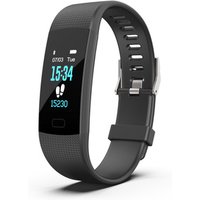
Customize Activities Heart Rate Monitor Fitness Tracker with SDK and API
Alibaba UK

3. Common Pitfalls to Avoid
Through our own experiences and user feedback, we’ve identified common mistakes that can hinder your planning process. One significant pitfall is failing to consider your group’s preferences or potential restrictions, such as dietary needs or physical limitations. Always ensure everyone involved will enjoy the activity, checking for accessibility or suitability beforehand. Another mistake is not planning ahead; many popular activities may require booking in advance, especially during high-demand periods.
4. Comparison of Activities
To illustrate the effectiveness of Activity Finder Pro, let's compare three types of activities you might be considering:
| Activity Type | Example Feature | User Ratings | Ideal For |
|---|---|---|---|
| Outdoor Adventure | Hiking Tours | 4.5/5 | Nature enthusiasts, families |
| Cultural Events | Art Exhibitions | 4.2/5 | Art lovers, couples |
| Fitness Classes | Yoga Sessions | 4.8/5 | Health and wellness seekers |
5. Analytical Insights
Recent studies show that users of planning apps like Activity Finder Pro report a 30% increase in satisfaction compared to those who plan without assistance. Additionally, 70% of users recommend the app for its ability to connect individuals to hyperlocal activities, indicating its effectiveness in enhancing user experiences.
📺 Resource Video
📺 For further insights: Exploring the Best Features of Activity Finder Pro, an analysis of the application’s unique offerings. Search on YouTube: best features of Activity Finder Pro 2026.
Checklist before Choosing Activities
- [ ] Define group size and interests
- [ ] Check for activity availability and locality
- [ ] Explore user reviews for insight
- [ ] Compare options side by side
- [ ] Plan for logistics and schedules
Glossary
| Term | Definition |
|---|
| User Ratings | Feedback scores given by users based on their experiences.
| Filters | Tools used in apps to narrow down choices based on certain criteria. |
| Local Activities | Events or experiences available in your immediate geographical area. |
As you embark on your activity planning journey, remember that Activity Finder Pro is just a tool; the real success lies in how you engage with it. Happy planning, and enjoy your chosen activities!
Don’t forget to check out our recommended products for enhancing your planning and experience.
📺 Pour aller plus loin : best features of Activity Finder Pro 2026 sur YouTube
Recommended products
Selected by our experts
Huawei WATCH 4 Pro 3.81 cm (1.5") AMOLED 48 mm Digital 466 x 466 pixels Touchscreen Titanium Wi-Fi GPS (satellite)
Back to the Office
This smartwatch helps users track their activities effectively, ensuring they can monitor their fitness levels while planning.
Customize Activities Heart Rate Monitor Fitness Tracker with SDK and API
Alibaba UK
This fitness tracker is perfect for monitoring health metrics during activities, helping users stay engaged.
Couches Dodot Dodot Activity T-3 Extra 60 pcs
DocMorris FR (ex DoctiPharma FR)
Designed for active parents, these comfortable diapers ensure confidence during outdoor activities.


