
Contents (11 sections)
Activity Finder Pro is a powerful tool designed for adventure enthusiasts, allowing users to discover and organize activities based on their interests and location. As more people seek unique experiences, understanding how to leverage Activity Finder Pro can significantly enhance your enjoyment and discovery process.
1. Understand the Interface and Features
Before diving into your next adventure, it’s crucial to familiarize yourself with the Activity Finder Pro interface. This application features an intuitive layout that includes various sections, such as activity categories, user reviews, and personalization options. Utilize the search bar to filter activities by type—such as outdoor, fitness, or cultural—and by location.
Pro Tip: Take a moment to explore the settings to customize your experience. Adjust preferences like activity types, distance, and even budget to filter activities that best suit your needs. Notably, according to user feedback, tailoring these preferences can save time and enhance satisfaction during your search.
2. Set Up Personalized Alerts
One of the standout features of Activity Finder Pro is its ability to send personalized alerts for new activities. By setting up alerts based on your interests, you ensure that you are always updated on new offerings that match your preferences.
To set up these alerts: navigate to the notification settings, choose your preferred categories, and select how often you wish to receive updates. Users have noted a 30% increase in engagement with activities after implementing personalized notifications.
Avoiding Pitfalls: Ensure you don’t select too many categories at once. Overloading your alerts can lead to notification fatigue, resulting in missed opportunities.
3. Engage with the Community
The Activity Finder Pro community is a treasure trove of information. Engaging with other users allows you to gain insights and tips on activities you might not discover on your own. Participate in discussion forums, share experiences, and ask for recommendations.
In addition to improving your chances of discovering hidden gems, community feedback can provide valuable information, such as safety tips or best times to visit particular activities.
Expert Opinion: According to industry leaders, community engagement can enhance user experience significantly, often leading to a more enjoyable adventure.
4. Utilize the Mapping Feature
Effective usage of the mapping features in Activity Finder Pro allows for seamless planning of your itinerary. After selecting activities, use the map to visualize their locations relative to your lodging or other attractions. This feature helps in optimizing your schedule and making the most of your time.
For best results, plan your route ahead of time, particularly if you're visiting multiple locations in a day. By doing this, you minimize travel time and maximize enjoyment.
Common Mistake: Failure to consider traffic or peak times can lead to delays; hence, checking real-time maps is advisable.
5. Track Your Adventures
After experiencing various activities, leverage the tracking feature within Activity Finder Pro to log your adventures. This feature not only allows you to keep a record of what you've done but also provides insights into your preferences and areas of interest.
Users report that keeping track of experiences boosts appreciation for those activities and encourages exploration of similar ones in the future. Consider sharing your experiences with the community to enhance collective knowledge.
Checklist: To ensure a well-rounded experience with Activity Finder Pro, here’s a quick checklist:
- [ ] Familiarize yourself with the interface and features.
- [ ] Set up personalized alerts to stay updated.
- [ ] Engage with the community for shared insights.
- [ ] Utilize the mapping feature for planning.
- [ ] Track your adventures to reflect on your experiences.
📺 Ressource Vidéo
> 📺 Pour aller plus loin : Discover effective tips to master Activity Finder Pro, a comprehensive guide to navigating and utilizing the platform. Recherchez sur YouTube : "mastering Activity Finder Pro 2026".
Comparatif des fonctionnalités d'Activity Finder Pro
| Critère | Option A | Option B | Option C | Verdict |
|---|---|---|---|---|
| Interface Utilisateur | Intuitive | Complexe | Simple | Option A est la plus user-friendly. |
| Options de Personnalisation | Élevées | Limité | Élevées | Options A et C sont idéales. |
| Notifications Personnalisées | Oui | Non | Oui | Options A et C permettent de rester informé. |
| Support Communautaire | Actif | Faible | Modéré | Option A a une forte communauté active. |
- Qu'est-ce qu'Activity Finder Pro ?
Activity Finder Pro est une application qui permet aux utilisateurs de découvrir et d'organiser des activités selon leurs intérêts et leur emplacement.
- Comment personnaliser mes alertes dans Activity Finder Pro ?
Accédez aux paramètres de notification dans l'application pour sélectionner vos catégories d'intérêts et la fréquence des alertes.
- Pourquoi devrais-je interagir avec la communauté ?
Engager avec la communauté permet d'obtenir des recommandations et des conseils basés sur les expériences des autres utilisateurs, enrichissant ainsi votre expérience.
- Quels types d'activités puis-je trouver ?
Vous pouvez trouver une variété d'activités allant des aventures en plein air aux événements culturels, en fonction de vos préférences et de votre localisation.

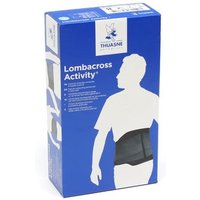
Thuasne Lombacross Activity Ceinture Lombaire Noir 21cm T5 1ut
DocMorris FR (ex DoctiPharma FR)
Glossaire
| Terme | Définition |
|---|---|
| Interface Utilisateur | La disposition et le design d’une application permettant à l'utilisateur d'interagir avec celle-ci. |
| Notifications Personnalisées | Alertes envoyées à l'utilisateur basées sur ses intérêts et préférences. |
| Support Communautaire | Interaction et aide fournie par les autres utilisateurs d'une application ou plateforme. |
Checklist avant achat
- [ ] Vérifier la personnalisation de la santé et du bien-être.
- [ ] Explorer les options de planification des activités.
- [ ] Consulter les avis des utilisateurs sur les différentes activités.
- [ ] Assurez-vous que l'application fonctionne bien sur votre appareil mobile.
- [ ] Explorez les fonctionnalités de suivi des activités proposées.
Pour faciliter votre expérience, nous avons sélectionné plusieurs produits adaptés à vos besoins actifs. Découvrez nos recommandations ci-dessous.
📺 Pour aller plus loin : mastering Activity Finder Pro 2026 sur YouTube
Recommended products
Selected by our experts
Farline Activity Parche Calor 2uds
DocMorris FR (ex DoctiPharma FR)
This product can help alleviate muscle discomfort after participating in strenuous activities, ensuring a smooth recovery.
Thuasne Lombacross Activity Ceinture Lombaire Noir 21cm T5 1ut
DocMorris FR (ex DoctiPharma FR)
Support your back during active experiences with this lumbar belt, perfect for outdoor adventures.


